 Špela Giacomelli (aka GirlLovesToCode)
AI has become an important part of our development processes. As with all tools, you need to choose the right one for your development workflow. So, in this article, we'll look at leveraging two AI tools designed for software development, Claude and Cursor, and compare and contrast them for FastAPI web development.
While Claude is an AI model that can be easily integrated into PyCharm, Cursor is an AI editor built on top of VSCode.
This article explores the same topics as Cursor vs. Claude for Django Development; however, instead of vibe coding, the tasks that the AI needed to complete were smaller, giving us insight into AI tools from a different perspective.
Process
The tasks given to both Cursor and Claude were performed on top of an already-created project. I used the same project that is built in the Full-stack FastAPI with HTMX and Tailwind course, a party management app. The idea is that users can list parties they're planning and provide/edit party details. Users can also manage gift registries and guest lists for each party.
I created the app without any AI help up through chapter 8 of the course. FastAPI, HTMX, and Tailwind CSS were all setup. The templates and migrations were working, and the first endpoint -- displaying all the parties -- was created, including the accompanying test. So both tools started from the same place, giving them a structure to follow.
To make the comparison as fair as possible, I used the same prompts for both tools. Each prompt included a part requiring the newly added code to follow best practices and existing code patterns. Additionally, prompts didn't follow each other immediately. Between all the tasks, I added some code so I could see how the tools act as helpers. All this is explained in more detail for each step below.
Add a New Endpoint Based on a Test
With the tests for endpoints that display and edit a party detail already written, I prompted the AIs to create a FastAPI frame for the click-to-edit HTMX pattern, but I didn't specify that in the prompt. In the prompt, I stated that the endpoints and templates should be created corresponding to the tests and that the tool should follow best practices along with my code style and structure. No information was provided that HTMX should be used, but at this point, HTMX was included in the project.
To give you an idea of what information the AI received, the names of the tests were:
test_party_detail_page_returns_party_detailtest_party_detail_form_partial_returns_a_form_with_party_detailstest_party_detail_form_partial_updates_party_and_returns_updated_party
Both solutions were incredibly similar, with only a few differences.
Claude vs Cursor
Claude ran the tests on its own, and they passed on the first try. Despite HTMX not being mentioned in the prompt, Claude used HTMX for switching between edit and detail mode. It also added a cancel button without it being mentioned in the prompt. Design-wise, the solution needed improvements, but it worked.
Cursor needed two prompts for the endpoints to work. The additional prompt was to fix the parameter without a default, following the parameter with a default. But that only got me to the point where the detail and edit endpoints were created. It needed an additional two prompts in order for the HTMX switching between edit and view mode to work.
Cursor better handled form parameters: Claude typed them all as strings, while Cursor typed them appropriately (e.g., date for party_date) and marked the fields as required. Additionally, the order of parameters was better set by Cursor -- it started with the request parameter, and Claude started with party_id.
Example
The most significant difference, where Cursor outperformed Claude, was the parameter of the party_detail_save_form_partial function.
Claude:
def party_detail_save_form_partial(
    party_id: UUID,
    request: Request,
    templates: Templates,
    session: Session = Depends(get_session),
    party_date: str = Form(),
    party_time: str = Form(),
    invitation: str = Form(),
    venue: str = Form(),
):
Cursor:
def party_detail_save_form_partial(
    request: Request,
    party_id: UUID,
    templates: Templates,
    session: Session = Depends(get_session),
    party_date: date = Form(...),
    party_time: time = Form(...),
    invitation: str = Form(...),
    venue: str = Form(...),
):
Add Test Based on New Endpoint
I added the endpoints necessary for displaying and editing a list of gifts. Since the endpoints were meant to be used with HTMX, there were quite a few:
- The main endpoint, which serves the whole gift registry page
- Endpoint that serves details for a single gift
- Endpoint that serves a pre-filled form for editing a single gift
- Endpoint that saves the form and returns the updated gift
I also added the create_gift fixture to conftest.py, so it could be used in the new tests. This fixture was similar to the create_party fixture, which was already used in the tests that I wrote manually.
Claude vs Cursor
Claude created 8 tests and Cursor 5. While Claude covered more edge cases (see the table below), it's worth mentioning that the tests that existed before this prompt covered only happy paths. So Claude covered more, but Cursor followed the codebase more closely.
Claude used the create_gift fixture, but Cursor didn't; it created the gift objects directly by hand each time.
These are the tests that they both created:
| Claude | Cursor |
|---|---|
| test_gift_registry_page_returns_list_of_gifts_for_party | test_gift_registry_page_returns_list_of_party_gifts |
| test_gift_registry_page_returns_empty_list_when_no_gifts | |
| test_gift_detail_partial_returns_single_gift | test_gift_detail_partial_returns_gift_detail |
| test_gift_update_partial_returns_edit_form | test_gift_update_partial_returns_form |
| test_gift_update_partial_returns_404_for_nonexistent_gift | test_gift_update_partial_returns_404_for_missing_gift |
| test_gift_update_save_partial_updates_gift | test_gift_update_save_partial_updates_gift_and_returns_detail |
| test_gift_update_save_partial_updates_gift_with_optional_link_empty | |
| test_gift_update_save_partial_returns_404_for_nonexistent_gift |
In the test_gift_registry_page_returns_list_of_gifts_for_party test, Claude created three gifts -- two belonging to the specific party and one belonging to another party, ensuring that only gifts belonging to one particular party were returned. Cursor only created a single gift and checked that the gift was returned.
Example
Here you can see the different approaches they both took to writing the test covering the gift registry page.
Claude:
def test_gift_registry_page_returns_list_of_gifts_for_party(
    session: Session,
    client: TestClient,
    create_party: Callable[..., Party],
    create_gift: Callable[..., Gift],
):
    party = create_party(session=session)
    gift1 = create_gift(session=session, party=party, gift_name="Gift 1", price=10.50)
    gift2 = create_gift(session=session, party=party, gift_name="Gift 2", price=20.00)

    # Create another party with a gift to ensure we only get gifts for the correct party
    other_party = create_party(session=session, venue="Other Venue")
    create_gift(session=session, party=other_party, gift_name="Gift 3", price=30.00)

    url = app.url_path_for("gift_registry_page", party_id=party.uuid)
    response = client.get(url)

    assert response.status_code == status.HTTP_200_OK
    assert response.context["party"] == party
    assert len(response.context["gifts"]) == 2
    assert gift1 in response.context["gifts"]
    assert gift2 in response.context["gifts"]
Cursor:
def test_gift_registry_page_returns_list_of_party_gifts(
    session: Session, client: TestClient, create_party: Callable[..., Party]
):
    party = create_party(session=session)
    gift = Gift(gift_name="Toy Train", price=Decimal("15.50"), link="https://example.com", party=party)
    session.add(gift)
    session.commit()
    session.refresh(gift)

    url = app.url_path_for("gift_registry_page", party_id=party.uuid)
    response = client.get(url)

    assert response.status_code == status.HTTP_200_OK
    assert response.context["party"] == party
    assert len(response.context["gifts"]) == 1
    assert response.context["gifts"][0] == gift
Creating Similar Functionality
Up to this point, I added quite a bit of the code myself. I had a fully functioning gift registry page where I could add, edit, or delete gifts. AI was only used as much as you've seen in the article so far; all other endpoints and tests were created manually. Thus, both AI tools had examples from the existing gift registry implementation that should have helped them generate a parallel set of endpoints and templates for the guest list on their own.
The prompt defined the requirements in detail, stated what was done in the gift registry, and said it should follow that example. It also stated that it should use HTMX to achieve a single-page effect and that it should cover endpoints with tests.
Claude vs Cursor
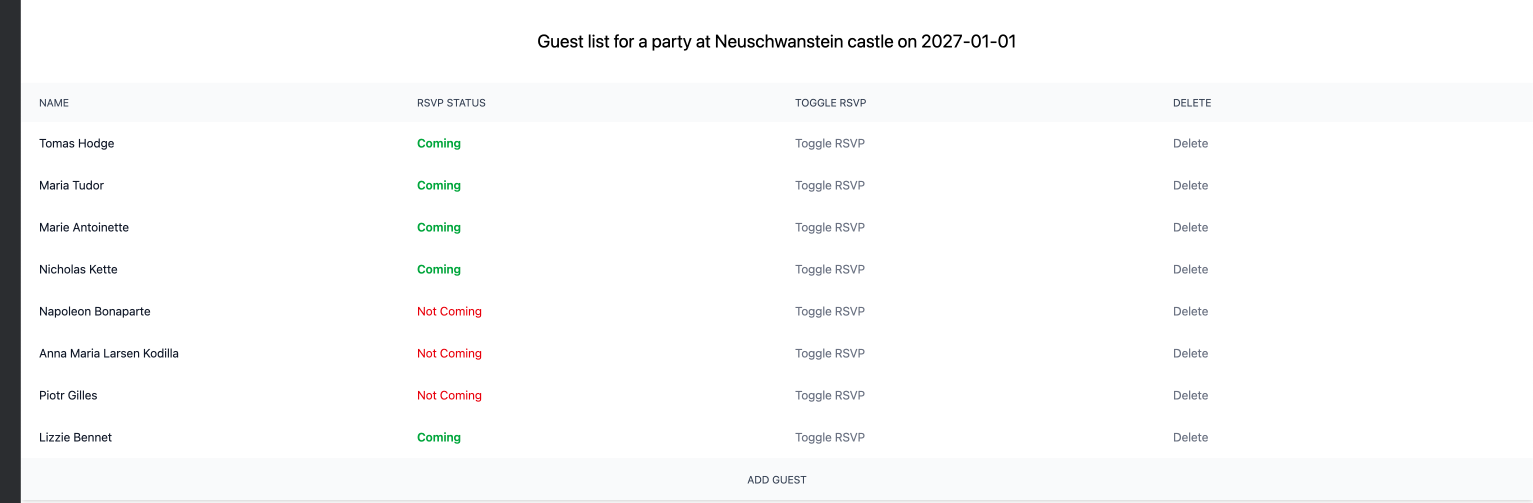
The result they both achieved in the browser was remarkably similar. One of the things I found interesting is that they both used "Toggle RSVP" for changing the guest attending status. I didn't use that wording in my prompt.
Here you can see how they both produced almost identical results:
Claude:
Cursor:
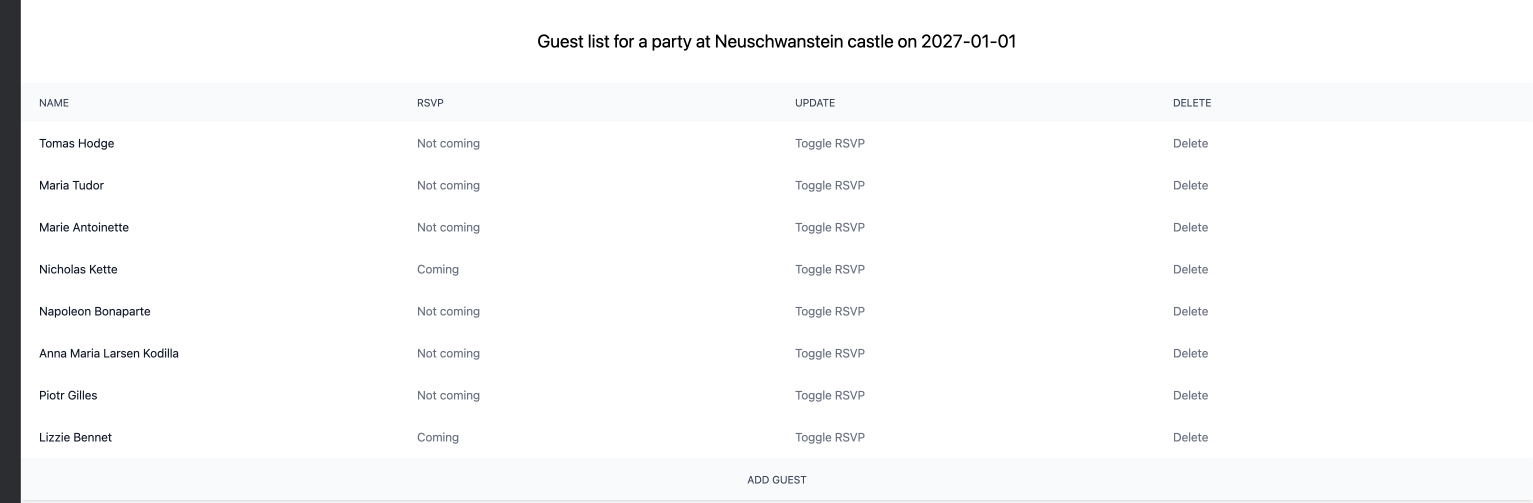
Between the two, Claude was significantly faster. Unlike Cursor, Claude added the URL to the guest list link that already existed, but had the href value empty. Unlike Claude, Cursor used an already existing GuestForm Pydantic model.
The most significant difference was their approach to changing the RSVP status (attending/not attending). In Claude's version, the request simply hit the endpoint with a PUT request, and the backend toggled the status. Cursor's endpoint, on the other hand, accepted a boolean and set the value of attending based on the value of the boolean. See the example below to better understand the difference.
Claude added 11 tests, along with happy paths, covering cases of nonexistent parties or guests. Cursor added 5 tests, covering the happy paths. Both suitably used pre-existing fixtures.
Examples
Form parsing
Claude using separate form parameters:
@router.post("/new", name="guest_create_save_partial", response_class=HTMLResponse)
def guest_create_save_partial(
    party_id: UUID,
    request: Request,
    templates: Templates,
    name: str = Form(),
    attending: bool = Form(False),
    session: Session = Depends(get_session),
):
Cursor used the Pydantic model:
@router.post("/new", name="guest_create_save_partial", response_class=HTMLResponse)
def guest_create_save_partial(
        party_id: UUID,
        request: Request,
        templates: Templates,
        guest_form: Annotated[GuestForm, Form()],
        session: Session = Depends(get_session),
):
RSVP update
Claude's approach to toggling the status of attendance:
@router.put("/{guest_id}/rsvp", name="guest_rsvp_toggle_partial", response_class=HTMLResponse)
def guest_rsvp_toggle_partial(
    party_id: UUID,
    guest_id: UUID,
    request: Request,
    templates: Templates,
    session: Session = Depends(get_session)
):
    party = session.get(Party, party_id)
    guest = session.get(Guest, guest_id)

    if not guest:
        raise HTTPException(status_code=status.HTTP_404_NOT_FOUND, detail="Guest not found")

    # Toggle the attending status
    guest.attending = not guest.attending

    session.add(guest)
    session.commit()
    session.refresh(guest)

    return templates.TemplateResponse(
        request=request,
        name="guest_list/partial_guest_detail.html",
        context={"guest": guest, "party": party},
    )
Claude's HTMX part:
<button type="button"
        hx-put="{{ url_for('guest_rsvp_toggle_partial', party_id=party.uuid, guest_id=guest.uuid) }}"
        hx-target="closest .table-row"
        hx-swap="outerHTML"
>
    Toggle RSVP
</button>
Cursor's approach to toggling the status of attendance:
@router.put("/{guest_id}/attending", name="guest_update_attending_partial", response_class=HTMLResponse)
def guest_update_attending_partial(
        party_id: UUID,
        guest_id: UUID,
        request: Request,
        templates: Templates,
        session: Session = Depends(get_session),
        attending: bool = Form(...),
):
    party = session.get(Party, party_id)
    guest = session.get(Guest, guest_id)

    if not guest:
        raise HTTPException(status_code=status.HTTP_404_NOT_FOUND, detail="Guest not found")

    guest.attending = attending
    session.add(guest)
    session.commit()
    session.refresh(guest)

    return templates.TemplateResponse(
        request=request,
        name="guest_list/partial_guest_detail.html",
        context={"party": party, "guest": guest},
    )
Cursor's HTMX part:
<button type="button"
        hx-put="{{ url_for('guest_update_attending_partial', party_id=party.uuid, guest_id=guest.uuid) }}"
        hx-vals='{"attending": {{ "true" if not guest.attending else "false" }}}'
        hx-target="closest .table-row"
        hx-swap="outerHTML"
>
    Toggle RSVP
</button>
Recommended Improvements
After the party list, details, gift registry, and guest list were created, I asked both AI agents for recomendations on how to improve the app.
Cursor was significantly faster with the recomendations. In total, there were 43 recomendations. Cursor split them into 7 topics:
- Product and UX
- Data and Features
- Architecture and Code
- Security and Privacy
- Reliability and Ops
- Performance and Data and Testing
Claude had 24 recomendations. It explained them more thoroughly and made a priority recommendation.
Since they both had so many recomendations, I asked them to choose the three most important improvements and explain how they would approach them. Again, Cursor was significantly faster. Claude was more detailed; it added implementation details. This was a double-edged sword, since it made it harder to read, but it also meant better control over what would be implemented.
They both suggested "User Authentication & Authorization" as the most important improvement. Cursor suggested "RSVP workflow" for the second improvement, and Claude suggested "Party creation/deletion". The third suggestion was the same for both: "Gift reservation".
Conclusion
You can read a similar comparison in the Cursor vs. Claude for Django Development, where differences were larger due to vibe coding. While the Django app was developed faster, since it required only a few lines of instructions, the FastAPI code is more readable and follows good practices. Cursor and Claude also didn't make any senseless mistakes in this setup, and the added code was almost indistinguishable from the code I added.
Unlike in the Django experiment, where I let the AI run free, the differences here were smaller. When AI tools are provided with developer-created code and instructed to create smaller chunks of code with detailed instructions, the implementation differences are slight. The result the end user sees is almost the same.